Educational Software Training
Audience
Software platform end-users, both internal (employees) and external (customers)
Approach
ADDIE, Experiential Learning Theory, Kirkpatrick’s Model of Evaluation
Tools
Camtasia, Adobe, HubSpot CMS, Doc360
Process
To start, my main focus was on auditing the existing training library to identify what was outdated — whether due to expired branding, software updates, or shifts in company messaging. I worked closely with stakeholders and subject matter experts to pinpoint which lessons and videos needed complete rebuilds versus minor updates.
I then mapped out each lesson, rewrote scripts to reflect the current software interface, and updated terminology to align with the latest product language. I also standardized a glossary of common terms so learners had a consistent reference point across modules, and subsequently built out the knowledge base in Doc360.
Once scripts were approved, I recreated the training videos from the ground up — capturing new software walkthroughs, recording fresh voiceovers, and updating thumbnail images to reflect the current brand identity. Each video was designed with accessibility in mind, including captions and downloadable scripts.
Finally, I uploaded and organized the refreshed content within the LMS, ensuring that lesson structure, tagging, and metadata supported easy navigation for learners and simple reporting for administrators. Throughout the process, I applied Kirkpatrick's Four Levels to gauge learner reactions, knowledge retention, and behavioral shifts once the updated training went live.

Video Development
The core of this project centered on recreating every training video to reflect the current software and brand standards. I storyboarded each lesson, recorded fresh screen captures of the updated software, and provided the voiceover to maintain a consistent narrative tone across the library.
Attention to pacing, visual clarity, and on-screen callouts ensured that learners could easily follow along, whether they were watching for the first time or referencing the content as a refresher.
LMS Integration & Accessibility
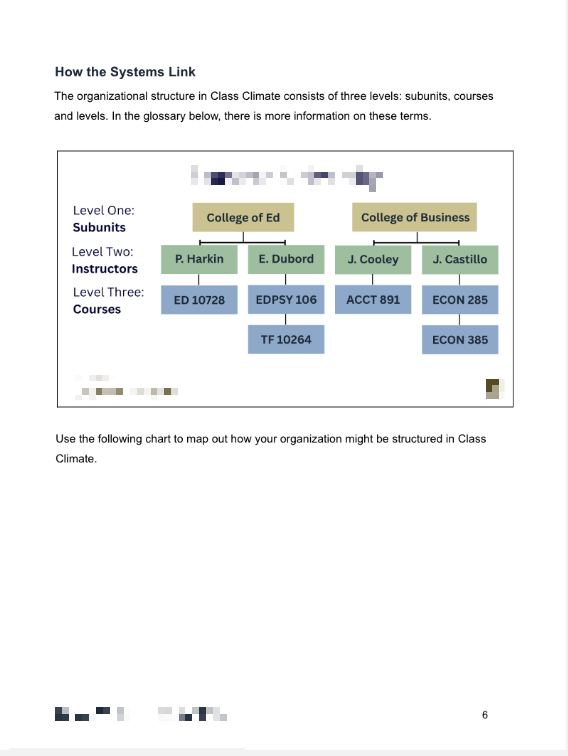
Each updated lesson was rebuilt within the LMS with attention to structure, discoverability, and accessibility. Captions and scripts were made available for every video, ensuring learners of all abilities and learning preferences could fully engage with the content. Updated thumbnails and visual branding also created a more polished, cohesive learner experience.
Training & Customer Reference Guides
Alongside the video content, all accompanying training and reference guides were updated to reflect the updated software and branding. Each guide was rebuilt with new screenshots, revised step-by-step instructions, and consistent terminology and voice.
Reflection
Revisiting and refreshing an existing training library gave me a unique perspective on the lifecycle of instructional content and the importance of iteration.
Content Longevity: This project reinforced that training is never truly "finished." As software evolves and branding shifts, instructional content must evolve with it. Building modular, easily updatable content from the start saves significant time down the road.
Voice & Delivery: Voicing the lessons myself deepened my appreciation for narration as a critical part of the learner experience. Pacing, tone, and clarity can make or break how well content is absorbed, and I gained new skills in scripting through this project.
Cross-Functional Collaboration: Working with stakeholders and SMEs to identify software changes and branding needs reminded me how essential clear communication is in contract work. Aligning early and often kept the project on track and ensured every update landed accurately.
Transforming workplace learning into fulfilling, empowering experiences.